PayRange
- 4.4
- Rating
- 1.00M
- Installs
- Free
- Price
 Analysis by App-foxy
I find PayRange most useful when I am standing in front of a compatible machine and want to pay without searching for coins, carrying cash, or handling a separate payment terminal. It is a shopping app from PayRange Inc. built around mobile payments for machines, so its usefulness is very practical rather than entertainment-focused. When the location supports it, the process can feel much quicker than the usual coin-operated routine.
The important distinction is that this is not a general shopping marketplace. I would not open it to browse products, compare retailers, or order household items. Its purpose is narrower: helping me pay at participating vending, laundry, and other machine-based points of sale through a phone. That narrow focus is also its main strength. The app does one job, and the quality of that experience depends heavily on whether the particular machine I am using supports PayRange.
How PayRange fits into everyday purchases
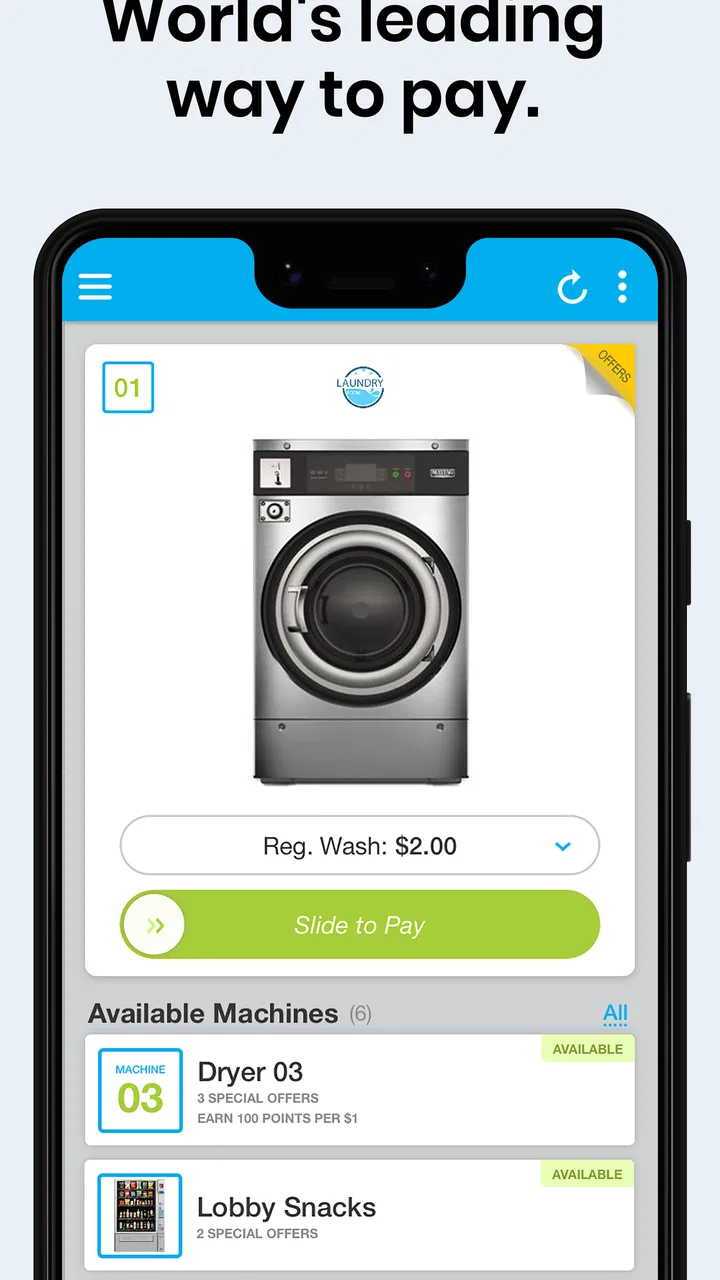
My first impression is that the app makes the most sense as a tool I keep ready for a recurring situation. Imagine arriving at a shared laundry room with a basket of clothes and discovering that the washers do not accept cards directly. Instead of checking pockets for change or leaving to find an ATM, I can use PayRange if the machines display its payment option. The app becomes especially convenient in places where I already expect to use the same type of machine again.
You May Also Like

 Blood Strike: 2.5 Anniversary
Blood Strike’s Loadouts Turn Every Drop Into a Tactical Gamble
A close look at Blood Strike’s custom loadouts: how fast access to signature weapons reshapes its battle royale rhythm, rewards preparation, and narrows the gap between fights.

 Pandora - Music & Podcasts
Pandora’s Music Is Easy to Start, but Harder to Recover
Pandora’s strength is its low-effort path from a seed to a station. Its weak spot is how much confidence it asks you to place in connection, setup, and quiet recovery.

 8 Ball Pool
 Is Built on Rivalries, Rematches, and Routine
A close look at the rivalries, rematches, shared routines, and unanswered safety questions that turn a quick pool match into a persistent mobile community.

 Samsung Music
’s Quiet Strength Is Playing What You Already Own
Its reach comes less from spectacle than from dependable access to a personal library. That simplicity is both the app’s strongest retention engine and its ceiling.

 AccuWeather: Weather Radar
AccuWeather Review: A Quick, Clear Forecast for Everyday Decisions
For everyday plans, the best forecast is the one you can understand quickly. AccuWeather makes rain timing, radar, and local conditions easy to act on, with a few trade-offs.

 Hill Climb Racing
Why Hill Climb Racing Still Turns Crashes Into One More Run
A tiny car, a bumpy hill and one more upgrade: Hill Climb Racing keeps resurfacing because its simple chaos makes every near-miss feel personal.
More From Our News Desk
View All News


The same logic applies to a vending machine in a workplace, residential building, school, hotel, or other supported location. I do not need a broad shopping account for this kind of purchase; I need a quick bridge between my phone and the machine. That makes the app less about browsing and more about reducing friction at the exact moment payment is required.
PayRange is free to download, which gives it an easy starting point for occasional users. I can install it without committing to a subscription or buying the app itself. That does not mean every transaction is automatically free, because the purchase still depends on the price set by the machine and the payment arrangement shown during use. The useful point is that access to the app does not require an upfront purchase.
The app has been available since October 20, 2014, and its current version is 7.0.7. It supports devices running Android 6.0 or later. On the trust side, its public Android presence shows an average rating of 4.5 from around 93 thousand ratings, with more than 1 million installs. Those figures suggest that many people find the basic concept worthwhile, although they do not guarantee that every machine or location will provide the same experience.
The payment workflow matters more than the download
With a machine-payment app, the critical test is not how attractive the home screen looks. It is whether I can identify the right machine, approve the intended purchase, and see a clear result before walking away. I would treat the first use as a setup exercise: install the app before I urgently need it, complete the account and payment steps in a calm moment, and become familiar with the way supported machines are recognized.
That preparation is one of my practical recommendations. If I wait until a laundry cycle is already delayed or I am standing in a queue, even a short sign-in or payment setup step can feel irritating. Installing it in advance also lets me check whether the app behaves properly on my phone and whether I am comfortable with its payment flow before relying on it.
Another useful habit is to confirm the machine identifier and purchase amount before approving anything. A shared laundry room can contain several machines close together, and a vending area may have multiple payment points. A moment spent checking the selected machine is more valuable than assuming the nearest option is automatically the correct one. This is a small detail, but it is the kind of detail that separates a smooth machine payment from an avoidable support problem.
I also recommend keeping the phone charged when PayRange is part of a planned errand. A coin is independent of battery life; a mobile payment is not. The app can remove the need for cash, but it does not remove the need for a working phone and a usable connection at the point of purchase. That trade-off is easy to overlook because the app feels simpler once everything is configured.
What the free price does and does not mean
For me, the free app is valuable because it lowers the barrier to trying mobile payment at a supported machine. I do not have to pay merely to test whether this method suits my routine. If I use laundry machines regularly or often encounter compatible vending machines, avoiding coin handling can justify keeping the app installed even if I only open it occasionally.
However, I would not judge the value by the download price alone. The real question is whether PayRange saves enough time and inconvenience in the places I visit. Someone who already carries suitable coins, rarely uses machine-based services, or always has a card terminal available may gain very little. In that case, a free app can still be unnecessary clutter.
The app also should not be confused with a promise that every machine will accept mobile payment. Its usefulness is location-dependent. Before planning around it, I would look for the PayRange indication on the machine or in the surrounding instructions. If that sign is missing, I would bring a backup payment method rather than assume the app can convert any ordinary machine into a mobile-enabled one.
That limitation is not a minor technical footnote; it defines the product. PayRange is excellent when the payment ecosystem is already present. It is irrelevant when the machine is not connected to it. This is why I see it as a companion for specific routines, not as a universal replacement for cash or cards.
Where it beats coins and ordinary card payments
Compared with coins, the strongest advantage is convenience. I do not need to predict the exact change required, store a small collection of coins, or interrupt an errand to find cash. For laundry users, that can be meaningful because a single visit may involve several machines or repeat trips over time. The app turns payment into something I can handle from the same device I already carry.
Compared with a standard card terminal, PayRange can be more comfortable in places where the machine has no visible card reader. It is also a more natural fit for people who prefer not to insert or tap a physical card on a shared machine. The phone-based approach can make the payment step feel familiar, especially for users who already manage many daily transactions digitally.
There is a trade-off, though. A physical card is usually accepted in more places than a specialized machine-payment app. Cash is also easy to understand and does not require an account, an app update, or a charged phone. If I am traveling between many locations and do not know what payment systems they use, relying exclusively on PayRange would be less sensible than carrying a general backup.
The app’s focused design can also be a drawback for shoppers expecting a full retail experience. It is not where I would look for product discovery, delivery tracking, store coupons, or broad price comparison. Its value comes from completing a narrow payment task, so anyone wanting a more comprehensive shopping platform should choose a different kind of app.
Small habits that make the experience safer and smoother
I would keep notifications and transaction confirmations easy to review, especially during the first few uses. When paying at a machine, I want to know whether the instruction was accepted and whether the machine actually started the selected service. If the physical result does not match what I expected, I would avoid repeating the payment immediately. Checking the app status first can prevent turning a single uncertain event into two charges.
For shared laundry facilities, I would note the machine number before beginning rather than after the cycle fails to start. I would also take a quick look at the machine’s own display or indicator. The app handles the payment side, but the machine remains responsible for the physical service. Separating those two stages helps me identify whether the issue is selection, payment, or the machine itself.
For vending purchases, I would select the item only after confirming that the machine is ready and that the chosen product is available. A mobile payment can be fast enough to encourage rushing, but the usual vending-machine checks still matter. I would not treat the app as a guarantee that a product will dispense correctly; it is a payment method, not a replacement for checking the machine’s condition.
One less obvious trade-off is convenience versus visibility. With coins, I physically see what I insert. With a phone, the transaction is cleaner but less tangible, so I need to pay closer attention to the selected machine and the confirmation screen. That is not a reason to avoid PayRange, but it is a reason to slow down for a few seconds when the environment is busy.
Who will get the most from it
I think PayRange is a strong fit for people living in buildings with app-enabled laundry machines. The benefit becomes more noticeable with repeated use: the initial setup is spread across many future payments, and I no longer need to plan around coin availability. Students, renters, and anyone using shared facilities may find that this convenience is worth more than it would be for a person who owns a washer or rarely uses vending machines.
It can also suit workers or travelers who regularly encounter compatible vending machines in places where carrying cash is inconvenient. The app is particularly appealing to someone who already prefers phone payments and wants one more way to avoid handling a physical wallet. Since the app itself is free, trying it does not require a purchase decision beyond the normal machine transaction.
I would be more cautious if I used these services only once or twice a year. Infrequent users may forget their login details or discover that the machine they need does not support the app at the crucial moment. For them, carrying coins or a normal bank card may be simpler. The same applies to anyone using an older device below Android 6.0, since the current Android requirement makes compatibility an important first check.
People who want a complete shopping assistant should skip it as their main shopping app. PayRange does not replace a retailer’s marketplace, a grocery-delivery service, or a broad digital wallet. Its role is much more specific, and expecting it to cover those other tasks would lead to disappointment even if the machine-payment feature works well.
My final recommendation
I recommend PayRange when I regularly use machines that visibly support it and I value avoiding coins. The free access makes experimentation easy, and the focused purpose means I do not have to learn a complicated shopping platform just to pay for a laundry cycle or a vending purchase. In the right location, it removes a small but repeated annoyance.
I would not make it my only payment option. A charged phone, compatible machine, and successful connection are all part of the experience, while cash and ordinary cards remain more broadly useful. My preferred approach is to keep PayRange available for supported machines and retain a backup for locations where the system is unavailable or a transaction does not complete as expected.
Overall, PayRange delivers good value for a clearly defined audience rather than for every shopper. Its best feature is not breadth but practical convenience at the machine itself. If that matches my routine, the free app earns its place on my phone. If I never use compatible machines, there is no strong reason to install it simply because it belongs to the shopping category.
FAQs for PayRange
01What is PayRange and how does it work?
PayRange is a mobile payment app that allows users to make cashless transactions at vending machines, laundry machines, and other self-service devices. By connecting via Bluetooth, users can easily pay using their smartphones. The app is designed to simplify the payment process, eliminating the need for coins or cash.
02Is PayRange secure to use for transactions?
Yes, PayRange employs advanced security measures to ensure the safety of user transactions. The app utilizes encryption to protect personal and financial information, and no data is stored on the vending machines themselves. Additionally, users can enable biometric authentication for added security.
03Which devices and machines are compatible with PayRange?
PayRange is compatible with a wide range of vending machines, laundry machines, and amusement devices equipped with the PayRange Bluetooth module. You can find compatible machines by checking the app’s map feature, which shows nearby locations where PayRange is accepted.
04How do I add funds to my PayRange account?
Adding funds to your PayRange account is straightforward. Users can link their credit or debit cards to the app and add funds directly. The app also supports various payment methods, including Apple Pay and Google Pay, allowing for quick and convenient top-ups.
05Are there any fees associated with using PayRange?
PayRange itself does not charge users any fees for making payments. However, it's important to check if the machine operator imposes any additional service fees. These are typically displayed before completing a transaction, ensuring transparency for users.
Pros
- User-friendly interface for quick payments.
- Wide network of participating machines.
- Secure transactions with encryption.
- No need for cash or cards on hand.
- Supports multiple payment methods.
Cons
- Limited to specific vending machines.
- Requires internet connection to function.
- App may occasionally crash or freeze.
- Some features are region-specific.
- Bluetooth needs to be always on.

PayRange
Gallery